OpenSees Cloud
OpenSees AMI
A Minimal GitHub Actions Workflow for OpenSees
10 May 2026 - Michael H. Scott
GitHub Actions are usually associated with software workflows like continuous integration and deployment, somewhat removed from standard day-to-day OpenSees use cases. But the actions can also be useful for testing and reproducibility of earthquake engineering simulations.
This post shows a minimal GitHub Actions workflow for running the Little IDA script and producing a downloadable plot of the results.
GitHub Actions workflows are associated with a repository and exist as YAML
files in the repository’s .github/workflows/ directory. For this post, I
have created a public repository called
the-little-ida
with the following structure:
the-little-ida/
├── .github/
│   └── workflows/
│       └── run-ida.yml
├── little-ida.py
├── README.md
├── requirements.txt
└── tabasFN.txt
The run-ida.yml workflow below automatically runs the little-ida.py
script in the cloud when one of the following events occurs:
- Code is pushed to the
mainbranch (your analysis changes) - Once per month as a scheduled
crontask (detects changes in OpenSees over time) - Manually run on demand (useful for workflow development and debugging)
The workflow executes on a temporary cloud machine, or runner, using the latest Ubuntu as its operating system. GitHub Actions can occasionally stall, so a timeout of 10 minutes safeguards against unnecessarily long runs for the Little IDA.
The steps for the run-ida job are described below, after the YAML code
block.
name: GitHub Actions workflow for OpenSees IDA

on:
  push:
    branches: ["main"]
  schedule:
    - cron: "0 0 1 * *"
  workflow_dispatch:

jobs:
  run-ida:
    runs-on: ubuntu-latest
    timeout-minutes: 10
    steps:
      - name: Checkout repository
        uses: actions/checkout@v6

      - name: Setup Python
        uses: actions/setup-python@v6
        with:
          python-version: "3.12"

      - name: Install Python libraries
        run: |
          python -m pip install --upgrade pip
          pip install -r requirements.txt

      - name: Setup OpenSeesPy
        uses: mhscott/setup-openseespy@v1

      - name: Run Little IDA
        run: |
          python little-ida.py

      - name: Upload plot
        uses: actions/upload-artifact@v7
        with:
          archive: false
          path: |
            little-ida.png
Checkout repository
The first step of the job is to checkout, or clone, the current repository
onto the runner. This step uses the official
actions/checkout
GitHub Action, whose latest version is v6 at the time of writing this post.
Setup Python
Next, the workflow sets up Python on the runner using v6 of the official
actions/setup-python
GitHub Action. The Python version is specified as 3.12.
Install Python libraries
The workflow then installs specific Python libraries required for the
analysis by first upgrading pip then using pip install. It’s good
practice to use requirements.txt, a simple text file where you list one
Python library per line.
matplotlib
numpy
pandas
For the Little IDA, we only need matplotlib, but I listed additional common
libraries for demonstration. I intentionally omitted openseespy from the
requirements as this library is addressed in the next step.
Setup OpenSeesPy
In addition to official GitHub Actions, users can create publicly available
custom Actions that encapsulate specific setups. For example, I created
mhscott/setup-openseespy
whose initial version, v1, does a simple pip install openseespy on
Ubuntu, Windows, and macOS runners.
For v2 I plan for the setup-openseespy action to build OpenSeesPy from
source code using CMake. Custom actions are cleaner than copying, pasting,
and maintaining build instructions across multiple repos and runner operating
systems.
At any rate, this step uses the custom mhscott/setup-openseespy GitHub
Action to install OpenSeesPy on the runner.
Run Little IDA
The runner is now configured with Python and OpenSeesPy and other required
libraries. The workflow then runs the little-ida.py script using the same
syntax, python little-ida.py, that would be used at the command line on a
local machine.
Upload plot
The script produces a plot, little-ida.png, which we would like to access
after the runner terminates. To this end, we use the official
actions/upload-artifact
GitHub Action. Using v7 of this action, we
specify the path to the png file (all top level directory here) and that we
do not want a zip archive of the single file. With multiple files as
artifacts, you will get a zip file. By default, artifacts are available for
90 days.
You can access the artifact from the Actions tab on the repo’s GitHub page.
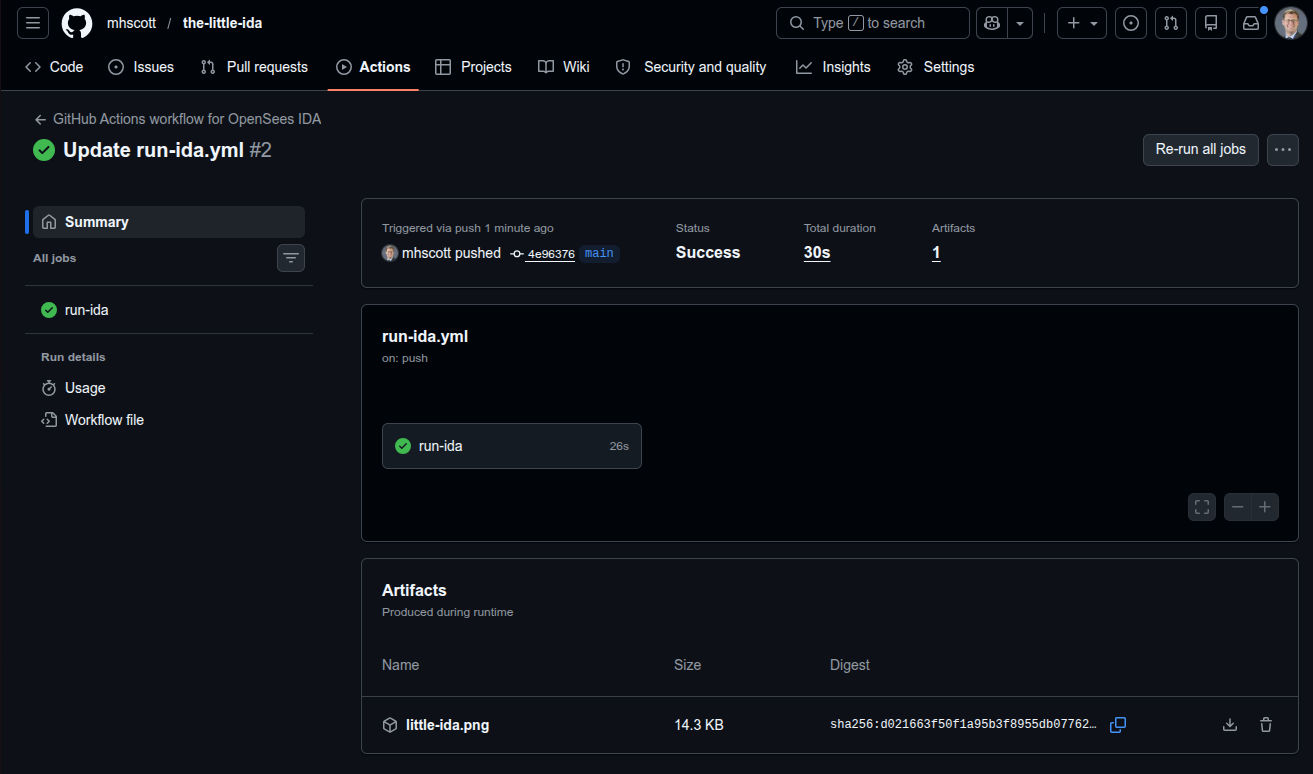
The IDA plot in the little-ida.png artifact should match the plot shown in
the original
Little IDA
post.
You can go wild with GitHub Actions workflows for testing, reproducibility, and maintaining correctness of your OpenSees analysis results. The sky’s the limit!